
Spud Ai
|
|
Spud Ai |
Spud Ai is a computer program that is an attempt to create artificial intelligence (AI). The program is built by taking my understanding of "the mind" and turning that understanding into a computer program. The program is also a practical tool and is used for numerous tasks in my everyday life.
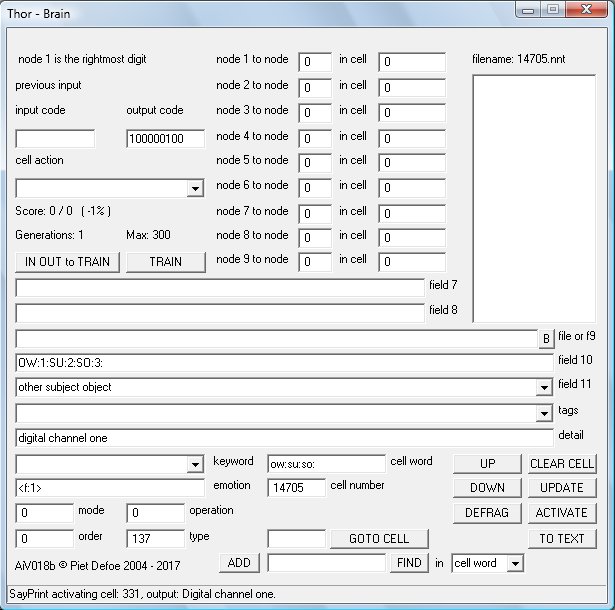
The Spud Ai's basic function is to process information in an intelligent manor and respond accordingly. It has numerous processing functions and algorithms that act on information in different ways most of these are language based which gives the Ai the ability to work as a chat bot. There is a main database called the Brain Database (BD), entries in the BD are called Cells. A cell can either hold information or it can be 'activated', when activated the cells neural network takes the input code, processes it through the network and produces the output code. How the input code is processed and the output it produces is dependant on how the network has been trained. The output nodes can be connected to other cells input nodes, the Tag field is also used to control how the output is used. As the Ai evolves the BD grows in size.
When used as chat bot the language processes take the input and process it in different ways. The majority of these processes come from flashes of inspiration. Whether these inspirational bits of code form some sort of mind or produce replies that show some form of intelligence only time will tell, as these work by forming connections that evolve as the Ai builds up its data base. Data is inputted manually or by the various learning processes (LM). Learning processes add data which is then worked on by the various processes, this gives the Ai the ability to output correct information without having being told about the specific subject but from associations only. Other processes are designed to give specific answers to specific questions or use some of the input in the output.
The Ai is packed full of functions which gives the Ai the ability to perform many practical tasks. As the Ai evolves more functions are added. Keywords associated to a cell word are used for many of the functions. Cells 800 to 2000 are know as system cells these are used by the various functions and processes including various input output devices from hardware to networking. Cell 2000 and upward are used for data storage like words and patterns.
The things the Ai can be used for is an ever growing list, its designed to be flexible in usage. There are functions within the Ai that are there because i've needed software to do a certain task. Instead of creating a new program i just add a new function to the Ai.
Here is a list of things i use the Ai for: searching indexed files for information, working as a chat bot on a web page, creating price list information for my company web site, indexing job files for my companies database, taking a picture of my solar controller and sending it to the web server, playing music, controlling relays in my house, monitoring and controlling power distribution from my renewable energy systems, object recognition for the robot mapping functions, controlling a robot, quick information like finding out tomorrows weather and the main news story and talking to.
The Ai is designed to do things i haven't even thought of.
The program is under constant test and runs for long periods of time it is designed to be as stable as possible, there are some functions that monitor program stability and react if any problems are found, either by fixing the problem automatically or by alerting the user.
The programs main input is text words which can be generated by voice to text programs, network messages, text files, keyboard, web page form etc. There is also ways of inputting data directly into the neural network.
The input is processed by the program and then it produces an output which could be to run a script, program, create a web page send a message through a network, create a sentence, activate the neural network.
The answer is created according to how the input is translated using various functions within the program which use information in the Brain Database.
The Ai program is available as a free download as long as you
accept and agree to the following:
We take no responsibility for
any consequences that may occur from using the program.
You must
not train the Ai to break its own law, know as Robot Law which is a
text file and is part of the download.
You must not disassemble
the program in any way.
You may use, pass on, redistribute as you
like as long as you don't remove any copyright notices. If you pass
the program on you must make sure you also supply the link to this
page.
The documentation may be unclear or at times confusing, this
situation will change over time as the project develops.
©
2004 - 2021 Piet Defoe
Latest version: AiV021h
Last update: 27-11-2021
Click here to download Spud Ai
Some browsers may try and stop the download citing a Unknown Publisher error. This is because registering software is somewhat complicated and probably expensive.
The Ai is running periodically on a server, the link bellow will connect you to the Ai if the server is on.
Click here to chat with the Ai During the winter months the server is on intermittently.
27-11-2021
Two new keywords have been added
MinutesAdd, This keyword adds the value of ToPrint which is the number of minutes to add to the time.
Toprint is then set with two numbers the first is the hours and the second is the minutes.
FileShuffle, this is designed to be used to create a shuffle playlist from say a playlist
created using FilesIndex which creates a file list in alpabetical order.
A new file is created using all the lines from the original. This means that all tracks are
played in a shuffled order without repeated tracks. The created file is the same name but with an x added to the extension.
FileShuffle works by reading the source file from the bottom
then placing it in a random position in the new file. If the random possition is taken then the line is
added to the next avaliable position. This can cause clusters of unshuffled tracks.
To increase the level of shuffling run the Keyword again but this time
use the created file as the file to shuffle.
All lines in the file must be no longer than 255 characters.
There is a limit of 10000 lines that can be shuffled.
Another file is created this is the original file name but with a z added to the end of the filename.
This file is a sorted list of the song names with the full filename removed and the file extension removed.
All numbers are removed also so are dashes and underscores.
This is so the list can be displayed on the web without comprmising security.
The contents of field 7 is added infront of each line and the contents of
field 10 are added to the end of each line, i use this for web code.
F7ActivateF10Millisec now has a backup function.
In rare circumstances the timer can get interupted if this happens then the F7TimerCheck is triggered and the
cell is activated by this backup function.
NNActivateCell, if there is nothing or text in field 11 then the current cell is activated.
This keyword is another way of activating cells when an input is processed.
If your activating a cell from within a function like ST of SC normally you would set the Operation field to 3
but in some situations this might not work as you want, if this happens use NNActivateCell.
CheckBrainFields, checks brain fields for errors.
If mode = 1 then a special function is used to remove the number 803 from node to cell field 5 and 1 from node to cell fields 6.
This will evolve into a function to clean all node to cell fields easly if they become corupted.
If the output says 0 then the function has been bypassed. If 1 then the function activated but nothing was
found. if the output is higher that 1 then this number is the number of times an error has been found.
28-03-2021
Its now possible to use aicell keyword in a web address or in a image name to activate a cell.
If the keyword is in an image name or a web address then the activation command is sent after
the page or image has been sent back to the client. E.g img src="aicell677.jpg"
this will download the image and then activate cell 677.
There is a new program called Mouse.exe this is a security program and is designed
to provide a way of accesing the computer if it is stolen. For this to be afective it needs to be running.
I have a link in the startup folder of my computer so it starts everytime the computer starts up.
Help on this program is still being written.
12-05-2020
This
version includes a new server program. This is a total rewrite using
a new software library.
04-11-2019
New
keyword Sum this is used for doing maths functions and is an upgrade
for the existing maths functions.
ImageAnalog this new Keyword is
used to view an incoming analog signal. It expands the signal before
displaying it in the DX window. Its designed to visualise minute
voltage fluctuations in the signal. Patterns form from the signal,
which can then be translated by the Image Scan Functions ISF. I've
been experimenting with this connecting the plant, water pipes and
robot frame to the analog input. Each produces a unique image.
Connecting to the robot frame enables the robot to detect when it
gets close to an electrical field. I've also attached a Theremin
which detects people giving the robot a simple way of being spatially
aware. The signal from the Theremin rises as a person gets closer to
the robot. At some point the ImageAnalog function will be able to be
connected with an ISF function directly without drawing the
image.
The help file has been update with a totally new section
for Settings.
ST and SC learning now have there own learning
option in the Settings dialog box. I've found that the ST function is
very useful when the Ai is working as a chatbot, whilst the SC
function works in a similar way it can be difficult to use and lacks
some of the function of the ST routine. In effect the ST function is
an upgrade from SC.
Any Midi input device can now be connected to
the Ai which activates cells on input. So far i've connected a Midi
keyboard and a DJ controller. Cells 1630 to 1740 are the default
cells used by the MiDi in device, more cells can be used if needed by
changing the settings in cell 1630 field 7.
There are 3 new User
Window tags <uwfile>, <uwlist> and <uwcheck>
Two
new program have been added. Midi Interface is a program that can
connect to a Midi input device and then send the information to the
Ai. This was created before the function was added to the main Ai
program.
AiLandscape uses 3D functions to create a 3d landscape
that you can fly though like a game. Its useful if you want to
explore an image in a totally new way. Images created or processed by
the Ai can also be used.
29-03-2019
A new program called
AiListPrograms.exe this creates a file containing the names of the
running programs on the computer.
The help file has been updated
including information on the Sain Smart program.
There is more
information needing adding to help this should be done over the next
few months.
There has been quite few tweaks and changes to the
main program, to numerous to mention here.
23-10-2018
Some more work has gone into the
mapping functions, these are designed to give the robot the ability
to build a map of its surroundings as it moves around.
The server
running the Ai online is sometimes turned off due to the large number
of requests coming from hackers overloading the broadband connection,
which is very slow anyway.
31-07-2018
This version has a new input filter
which works in the same way as a personal assistant or house ai. A
keyword is used to indicate to the Ai whether to processes the input.
This way random conversations or background noise don't trigger the
Ai to respond. I use windows speech recognition program. cell 1509
Mode field controls what inputs should be processed and what inputs
should be rejected.
If Mode = 1 then the input is only processed
if the word in field 7 is in the input.
If Mode = 2 then the node
words are used as trigger words
Two new Keywords RQFromF11 RQToF11
enable setting of the RQ's from a cell activation. The idea for this
is to be able to adjust the RQ's during the processing of the input
thus giving much more control on which output is used UNDER
DEVELOPMENT.
The Keyword ImageSave now saves the image as a 24 bit
Windows Bitmap (.bmp). If mode = 1 then the image is saved from the
image variable which is faster than the normal source which is the DX
window. The step value which is controlled by cell 947 Type field can
have an effect on the imaged saved.
The image is saved as raw
data with no compression.
Other methods of image saving have been
removed from the program as these have all been superceded by the
re-write of the ImageSave keyword.
The Server program is now
Version18. This version is a rewrite of the program with a lot of
attention paid to stability and making it work better on all types of
browsers, new and old. Its still not perfect in all situations but
its as good as i can get it! I use a standard server and embed the Ai
server page in an iframe.
20-04-2018
Buttons in the user window can now
have tool tips. The Detail field of a cell with the tag <uwbutton>
holds the text for the tool tip. A new keyword BDResize has been
created in order to fix a BD database that has become oversized. I
noticed that sometimes the size of the BD can increase without new
data being added, this bug has now been fixed and code to prevent it
happening has been added but this fix was done after creating the
keyword. I've kept the keyword in because it could be useful to
resize data bases that have grown before the bug fix.
10-04-2018
The latest version has a new
keyword ImageAudio this keyword converts either an image into sound
or a an audio file into an image. This is ongoing work in an attempt
to describe an image from a web cam into sound so a blind or
partially sighted person can hear what they can't see. The DX window
can now either work at 320x240 size or 640x480 size. A new Keyword
ImageMerge is an attempt to increase the resolution of images by
merging the images. The ability to scan an image at a lower
resolution has been added this is useful if working on 640x480 images
and you need the scan to be fast. The Help file is not yet updated
with the new keywords so please email
me if you need any help setting these up. This page has had some
text formatting removed to make it easer to read on different
devices.
08-12-2017
The latest version has some new
keywords one being Reverse. This reverses a sentence or the words in
a sentence, it makes the output sound like a different language. I've
started working on Function Keywords, these are keywords that
activate functions enabling various functions to be used say from a
cell activation, so far i've only done FunctionQNV. More work has
gone into organizing keywords better, new keywords that were other
keywords are: FileSortTwo, FileSortThree and FileSortFour. I've found
that having different methods of extracting information from web
pages is needed. There are now four file sort functions they differ
by the way there coded, which in turn means the do the similar thing
but in a different way!
Some more tags have been added to the ST
function these are ov: and ow: standing for other verb and other
word. The ST function is proving very useful especially when using it
with cell activations.
The server program AiServer15 has been upgraded and now works better, a few bugs were spotted which have now been fixed. The server now recognises the phrase aicode this gives more functionality to buttons on a web page. If in your html button code you have name="aicode001" then aicode001 will be put in front of the text from the edit box. The code aicode001 could then have a cell associated with it in the Ai's BD that then can trigger something to happen. I have a buttons that trigger different search functions using the text from the edit box. This works in a similar way as the code aicell but unlike aicell the server waits for a reply from the Ai before sending to the browser.
Some work has gone into the Help file but its still not up to date. A number of functions have been tweaked to make them work better details of these tweaks will be added to the Help file at some point. Old code that is no longer used has been removed from the program.
Robot legs has had some changes made and is due to start more trials when some components arrive.
12-04-2017
The main Ai program and the server
program AiServer13.exe can now use cookies. This means you can create
separate spaces which is only accessible if people log in. The server
sends the cookie to the Ai when it sends the incoming message which
can then be processed by the Ai before processing the main bulk of
the message thus structuring the reply and the way the page is built
based on the cookie information. When the Ai sends is answer back to
the server it can send cookie information as well. This could be
either to set a new cookie on the clients browser or to update the
value of an existing cookie. Using cookies provides an extra layer of
security, i use it to keep my house automation systems and robot
controls only accessible to authorized users, without it anyone could
access the server and start controlling the robot or operating the
lights or doors etc... Information on the browser type is also sent
to the Ai this information can be used to structure the page say for
a phone browser or a PC. I use my phone as a remote control for the
robots so i have to make the page buttons much bigger but on a normal
computer they are to big!
I've built my first walking robot. This has been quite a challenge due to the complexity of the walking process. Robot Legs taking its first steps
01-02-2017
A new version number for a new
year. A lot of work has gone into sorting out keywords and in some
cases changing keyword names in an attempt to group functions
together. During this clean up some keywords have been removed or
there function changed, the help file has been updated when this has
happened. Changes made are normally adding functions or changing the
fields used by the function in an attempt to conform to norms. Some
items in the help file have UNDER DEVELOPMENT next to them, this
means the way the function works might change or the information in
the help file might not be quite right.
A new Process called Connections (CON) has been built, this uses the words connected to inputted words when searching text file resources. The output used is the one with the most connections to the input. This process can be used in a number of ways. The Search Engine (SE) process can use it to scan the downloaded file. The keyword FileConnections also uses the process.
Robot Liz was used at a party and provided much entertainment. The
battery power worked well with at least 3 hours of constant use
driving around and using the pneumatic arm.
Construction has
started on a walking robot. The frame and legs are built with the
pneumatic cylinders attached. This robot should be able to better
negotiate different types of terrain which limits wheeled
robots.
Some new videos have been uploaded, the links are in the
YRC pages
28-11-2016
A strange bug has been fixed this
bug was causing program crashes when robots were auto navigating,
after 155 scans the program would crash. After 5 hours tracking down
the fault one line of code was removed which fixed the problem. Some
new functions have been added these include a decision function, this
uses either the analog input or the random number generator to
produce YES NO or MAYBE outputs. Another output filter has been added
this uses the structure of inputs to restructure the output. The
Neural Network outputs produce words in no particular order, the
output filter attempts to reorganize these words into a proper
formatted sentence Output filter 2 (OF FN2) uses logic to reorganize
the words the new function OF FN4 uses the structure of inputs to
reorganize the words. FN4 scans the Sentence Codes (SC), each code
scan creates a percentage value the highest percentage is used to
reorganize the words for the output. SC's are now added straight away
to the database up to now SC's were only added when the same code had
been found more than once in the short term memory. Another new
keyword is SCFromText this reads a text file containing correctly
structure sentences, these sentences are converted into SC's and if
not already present added to the BD. If a word in the sentence is not
present or the type value for the word isn't set then the sentence is
rejected. This is a fast way of adding SC's which are used by OF FN4.
In Settings the tick box Log Stats has been changed to Log Scroll this adds the scroll output to the daily log useful if you need more information on the Ai functions.
In November the robots were used as part of the Big Draw campaign run by Kirklees. The project was to encourage people to draw, the robots joined in with the drawing, mostly by people controlling the robots which had a pen attached to there arms. New functions were created for the project, the keyword ImageInstructions converts image information into instructions which can then be read using another new keyword ReadLine. ReadLine reads a line in a file every time the keyword is found in the input or from a cell activation, the information can then be used to send instructions to the robot. The functions enable the robot to capture an image from its camera then draw the image on paper. Whilst this all works it doesn't work very well!! More time is needed to perfect the process the problem is getting the robot to move to the precise position. Fine movements are affected by the position of the caster wheels at the back of the robot. The casters could be fixed in place but this would impact on general movement. The robots were taken to a school, an education center and an art college. This was an invaluable experience as it was the first time the robots have operated in a public environment. The robots worked well with no breakdowns people were given a quick talk before using the robots and were able to start using them within minutes. The main instruction was to tell people about the off switch which all the robots have placed in an accessible place, this instantly disconnects all electronics and stops the robot should they start doing something odd. The off switch was used but not due to any fault in the robot mostly due to people loosing control. Robot Hamish's arm was damaged during the last event this was due to a design flaw. The arm has been rebuilt using the same design as robot Lizs' arm. The new arm is a lot stronger.
07-09-2016
Some slight changes and refinements
to the main Ai program.
Included in the zip file is a new program
called SainSmart 04. This program is used to send instructions to the
SainSmart
iMatic device
The iMatic device is not Wifi even though it
seems to suggest this in its name it needs to be connected by a
physical cable to a network hub. It has the ip number 192.168.1.4 The
program connects to the device via sockets which is why it cant be
controlled from a web browser. There are 8 buttons switching the
relays on or off and also buttons that send the motor instructions to
Robot Four. The program can receive messages from the Ai program or
other Spud software like the Ai Server program. I use the Ai to send
instructions to the program this gives me the facility to control the
robot from the keyboard. It also means the Ai can control the robot
using object recognition if an ip-camera is mounted on the robot.
There are some limitations to controlling the robot this way but not
needing a computer on every robot is advantageous. It should also be
possible to control the robot from a smart phone mounted on the
robot, this would require writing a new App
Robot Four has a
network hub which connects by cable to the iMatic and by wifi to the
computer controlling the robot.
25-07-2016
A new version. Some changes have
been made to the BD cell form layout. The new robot, Liz is working
well and is now able to locate move to and pick up objects from the
floor totally autonomously. I've uploaded a new video showing it
picking up keys. Liz
picking up keys
I've started working on a new robot that will
be controlled from a smart phone. This robot will be smaller and more
portable.
27-04-2016
The WSB process has changed. The
graph is now drawn in the DX window and the speed of learning has
been increased. The process can be set to work from the computers
random number generator. This means it works without the need for the
K8055 card to be connected. More functions have been added including
the ability to hear the signal. The help file has been updated.
I've been testing a new robot. Robot Three is a four wheeled robot and has been built using the lessons learnt from building the previous robots. I posted a video on YouTube showing the robot auto-navigating Robot Liz auto-navigating.Some new functions have been added to the Image Scan Functions ISF. The robot is now able to auto-navigate around a room for long periods of time. The way the drive works is a different on robot Liz. The motors keep going until a new instruction is received. This makes its movement smoother and faster, driving the robot like this also makes the ISF functions work better. To navigate successfully its set to look for colors red and green, shadows and edges. The image sample rate is about 600 milliseconds, this is how long it takes to take the picture process it and send the instructions to the motors. I've been experimenting with the robot finding keys on the floor. It does this by looking for a specific color and then stopping movement and vocalizing that it has found something. This works really well and i've also started experimenting with a camera on a hat which you wear and it gives you verbal instructions where the keys are on say a table. This technology could be adapted to help people with visual impairment, if anyone is interested in using it for this and wants to know more then please email me, i would also be interested in helping on a project like this.
17-11-2015
This update has a couple of new
Emotion functions. One of these gives the Ai the ability to asses if
the inputted sentence is framed in a positive or negative way. The
other function is a Word Swopper (WS). This changes nouns and verbs
in the input. Some new Keywords have been added. Some older functions
have been removed this is because there are other ways of doing the
same thing. If anything disappears that you use then please let me
know and i'll send details of how to do the function in other ways.
22-09-2015
A new version, this version has a
new process called Sentence Types (ST). This process is based on
latest brain research which talks about a Formula Of Language (FOL).
Some words are given a code called a ST code, in a similar way to
word types but not all words are assigned a code and a word could
have more than one code. A number of codes are setup by the
SuffixFind keyword. ST code meanings are structured around the
requirements for the FOL. Normal word types are the traditional types
like nouns and verbs, ST codes use some of these. The number of ST
codes is kept as low as possible to reduce the complexity of he FOL,
unlike normal word types which, when used by pattern recognition
works better the more different types there are. The ST process is
working very well even though the FOL is still under development and
not yet fully functional.
The robot arm is built and working a
video of it moving a beer can,
can be seen here.
This version has some new keywords, tags and
the help file has been worked on.
The output filter now has a
Grammar filter. This is designed to re-order words into correct
english. Outputs produced by processes that use neural networks tend
to produce a sting of words relevant to the conversation but spat out
in a jumbled manor. The grammar filter re-orders and excludes words.
This filter when run in reverse turns normal language into an output
that sounds like something Yoda from Star Wars would
say!
ImageScanFunctions now include movement detection and
vertical intersection data collection. Both of these have been
developed to give the Ai data on the position of the robot arm. I'm
also looking at using the functions to read a chess board and
distinguish between different pieces on a square irrespective of
there position or orientation in the square
10-07-2015
This version has some new image
scan functions which include movement detection and a way of finding
the vertical coordinates of objects. ISF's can now be lumped into one
scan thus speeding up processing time. It takes less than a second to
download, scan, process and respond to images from the web cam. Some
new keywords have been added and a couple of processes have had some
optimization work in order to speed up processing times. I noticed an
Ai with over 40,000 entries in the BD was running a bit slow. Most of
the Ai's i use have around 5000 to 15,000. I've been working on
making the documentation clearer. Work has started on the robot arm
which is powered by air. Its being attached to Robot Hamish, some of
the new image scan functions are being designed to track the position
of the arm. What i really need is a way of finding out how far the
air ram has extended.
27-04-2015
I've uploaded a video to YouTube
Robot Hamish
auto-navigating. The video shows robot Hamish auto-navigating
around a room. These days the robot is pretty good at avoiding
objects. Training the robot to navigate the room has been quicker
than expected, the robot quickly finds places to get stuck in which
it can then be trained to avoid.
08-04-2015
The latest version includes a new
keyword ImageScanFunctions this is a collection of functions that
analyze images. At present there are 23 functions these include
functions that highlight colors, areas of shade and another vertical
and horizontal line finder function. These have been created for
robot navigation and to enable the robot to distinguish between
objects. I use 5 of these functions for the robot to navigate in a
room with various objects being detected by the functions, all image
processing is done in memory and image drawing and scanning is done
using the DX window this means using a number of different functions
in sequence only takes a fraction of a second. The room the robot is
in has a floor made of floor boards which are not even, there are
lines in between the boards which get detected by the vertical line
scan so the new functions are designed to get around this by using
different techniques. Another problem has been getting the robot to
distinguish between the wooden floor and wooden chair legs and piles
of burner wood. Using a variety of different techniques gets around
this problem. A code is created from the scan and this code is
compared to the previous 1000 codes created. Over time matches are
found and these can be added to the database. When a match is found
then cell 1611 is activated, the new tag <lookup-ac> can be
used to see if the code exists in the database and if so activate the
associated cell. Some of the functions adjust the image to prepare it
for other processes. Differences in light can effect the color
functions, i keep the robots lights on to minimize this effect and
also use a different data set for day and night. These functions are
enabling the robot to auto navigate for many hours without getting
stuck.
03-03-2015
New version AiV016i. Image scanning
routines have been worked on this is enabling the robot to roam
around a room using vision to guide it. A new keyword
ImageScanVerticalCalibrate gives the Ai the ability to reset its
vertical line scan sensitivity automatically.
The Image and DX
windows are now part of the user window which also has the ability to
embed up to 9 browser windows. This makes controlling the robot
easier
A grammar filter has been added to the output filter and
the ability to control which outputs are processed, also a new
process is being worked on called Sentence Type (ST).
An update
from Microsoft for Windows can make fonts go weard it can effect a
number of applications including the font used by the Ai. Microsoft
may send out a fix in the future i've fixed this problem on my
machines by removing the security update Kb3013455.
Some functions
have been updated to work better with cell activations and some
changes made to the way neural network training data is stored. The
training data files are stored in the weights folder and the Ai can
only look in this folder for the data, doing it like this means the
Ai will still work properly if the data is moved to other machines
running the program. The Brain dialog box has had some functions
combined and a couple of buttons removed. Training data is saved
automatically when the TRAIN or UPDATE buttons are pressed.
a
small bug in the code that generates the emotion code has been fixed
The help file has been updated
03-10-2014
I've just set up my latest venture
called Yorkshire Robot Company which can be found at yrc.biz. YRC has
been set up to commercialize the robots. At some point we intend to
set up a workshop or factory to build them and we are in the process
of looking for suitable premises in the Yorkshire area.
The
latest version of the Ai is still 16f with some new keywords and a
new program called AiK8055InterfaceV002.exe This program is used to
take inputs from a k8055 card and transmit them to the Ai. This
enables 4 cards to be used and gives allot of flexibility to how the
data can be processed. The program transmits a standard 9 bit neural
network code, information on what cell to transmit to and whether the
cell should be activated. The code transmitted by the program is used
to set up the input code of he named cell.
25-08-2014
A new version with more control
over the analog outputs. This is for better robot control the analog
outputs now use a cells input code to set the values. Robot Two is
now built more information about the robot
project can be found here. Version 16f has some more keywords and
some refinements to the DT routine.
22-05-2014
To speed up image processing time a
new Direct X (DX) window has been added to the program. Direct X is a
way for programs to communicate with hardware like graphics cards and
use their resources. The DX window is used mostly by the robot which
uses the keywords ImageLoadScan and ImageScanVertical to help with
navigation. Using Direct X means image processing takes under a
second using the DX window, if the DX window is closed then the Image
window is used which takes 4 seconds. Using DX means the robot can
now move at a reasonable speed.
17-04-2014
A new routine called DID short for
Dig In Deeper this is similar to the 6P routine but digs deeper into
the database to find word connections. The help file has been updated
and sorted out a bit more. I've made a few tweaks to the 6P routine
in an attempt to get it to use the best answer of the ones it
produces. The settings dialog box has been reorganized and a few more
functions added to the audio player. I use the ai to play music these
days as the quality seems better than other players. I think this is
because it uses the MCI device in the computer and thus communicates
with the sound card directly without doing any preprocessing to the
sound. A couple of new keywords have been added to clean in cell
fields. These are the cell numbers that a cell connects to and are
used by a number of processes. 6P learning and LM learning set up
these cells but sometimes strange associations appear whilst these
can be fixed manually I've found some instances where a small word
can have many associations. 6P learning has been tweaked to try and
reduce this from happening. A number of processes produce answers
that whilst they contain good words in there output the structure and
some of the words spoil the quality of that output. I'm trying to
work out a way of correcting these grammar mistakes. Its so easy when
you look at the outputs to work it out but getting the computer to do
it is proving very hard.
03-02-2014
This version has a number of new
routines and tweaks which are used for controlling the robot which is
now built. These new functions use edge detection to extract data
from an image captured by the robots web cam and use the information
to build up a location map so the robot knows where it is and can
navigate autonomously. These routines use an electronic compass which
is controlled using a separate program also part of the download.
This program sends the compass data to the Ai and sets input codes in
the Ai's Brain Database. Whilst the code is written i haven't had
much time or power to fully test the routines so how well this
technique works remains to be seen. The robot uses a laptop computer
and is powered by 2 car batteries, the motors are from an electric
wheelchair, the reason for building the robot so powerful is so it
can also be used for carrying heavy objects.
03-11-2013
Some new tags and an upgrade of the
autolearn keyword to make it more reliable and work on different
machines. The way Create HTML works has been changed. Tags are now
used in template web pages, the tag <cell: > activates the cell
whilst the page is being built, the tag is replaced with the output
from the cell.
Work has started on the Emotion routines and there
is a new Subject process. Some of the robot has been built i'm now
looking for two electric wheelchair motors so i can build the drive
unit.
08-10-2013
New server program called
AiServerV008.exe in the server folder. This is simple text only
tcp/ip server used to communicate with the Ai from a web page. This
is being used for house automation systems that i'm working on. At
the moment i'm using it to control relays which control various
systems around my house using my Kindle as a remote control. The
server provides a very simple and efficient way of communicating with
the Ai over networks and removes the need to set up a full web
server.
A new project i'm working on is to build a robot that will
be controlled by the Ai. The design has been worked out, how long it
will take to build depends on available funds!
15-07-2013
This version has a few bug fixes
and a few new functions which include the new keyword AutoLearn. This
enables the Ai to harvest online data and add it to its Brain
database. The QTF process which queries remote Brains has been
upgraded to work with this enabling a remote Ai to be used for data
acquisition then send it to another Ai when a QTF request has been
received. The keyword ExtractWords is a simple parser for web pages.
It extracts just the text from the page removing all coding tags. Not
all web pages work due to the way there designed and present text.
AutoLearn can be used to update a entry i use it for updating the
news entry and the weather entry so when i type in news i get the
days news. Words not in the database are searched for in a online
dictionary and the data including the word type is downloaded and
added automatically. When the QI process acts on this new data
logical conclusions can be made by the Ai that it hasn't been taught.
If you get the error: cant open file ALFile.txt you need to update
entry 1602 this is the System Cell used to control AutoLearn if LM is
ticked in settings, look in stuff to add to help.txt for details.
All text and background colors can now be changed using System
cell 816
04-02-2013
There are two versions of the
program in the latest release AiV015b is the latest version using two
databases. AiV016a is a total rebuild of the Ai. The biggest change
is the merging of the NNE and TF databases into one database called
the Brain database. When the program is first run it creates a new
file in the data folder called BrainDatabase.dat if the program finds
the TF database from previous versions then if offers the user the
option to import the data into the new format, no change is made to
the original file. The process of rebuilding the Ai is complex and
has produced a few bugs, most of which have now been fixed but this
is an ongoing process and more will appear. During this process all
functions are being checked and in some cases changed, a new help
file will be available soon.
01-06-2012
New version AiV015a.A few
improvements have been made these include; the ability to export the
TF database to spreadsheet CSV file and import a CSV file into the
Ai, some special codes that use numbers have been changed to make
import and export work. Optimized data storage for faster processing.
Upgrade to the image window and associated functions.
28-04-2011
The new DLL K8062.dll is used to
operate the Velleman K8062 USB to DMX controller. Signals can be sent
from the neural network to DMX devices.
The new Deeper Thought (DT) routine that changes and forms new connections in the neural network from changes made to the Ai's output is working well, this technique is enabling the Ai to learn.
20-01-2011
New routines that work by feeding
information back into the neural network enabling it to establish new
word connections and learn through conversation. This routine is
still being developed so information about it is in rough note form
which can be found in the file: stuff to add to help.txt in the help
folder.
We would be very interested to know what you think about the
program so please email us.
If you have a use for the Ai and need
some form of extra functionality or a change in the program to adapt
to you own needs then this may be possible but expect to pay
something!
The program has zero funding and is a labor of love so
if you want to invest in this project or any other Spud projects then
please email us at: spud@raisystems.com
Screen shots...
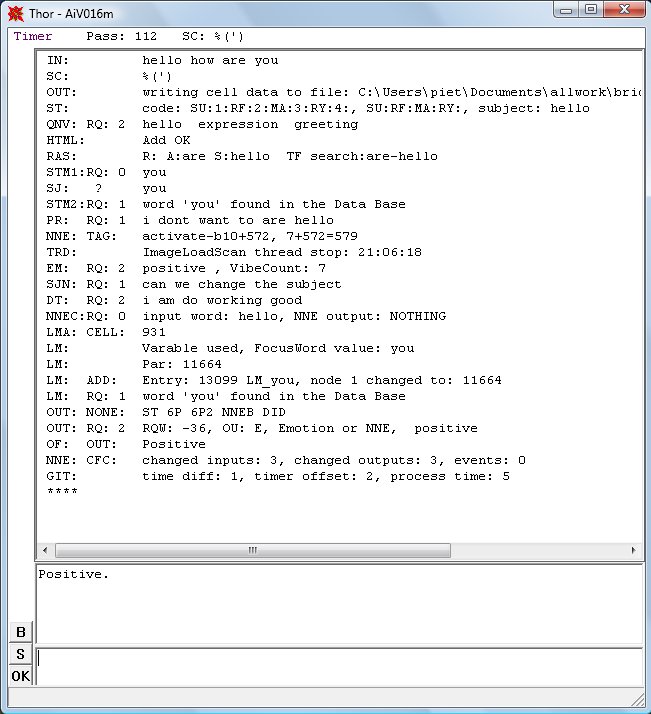
Ai main Window
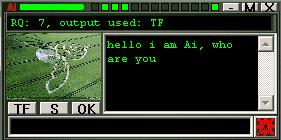
Ai small window
Brain Database
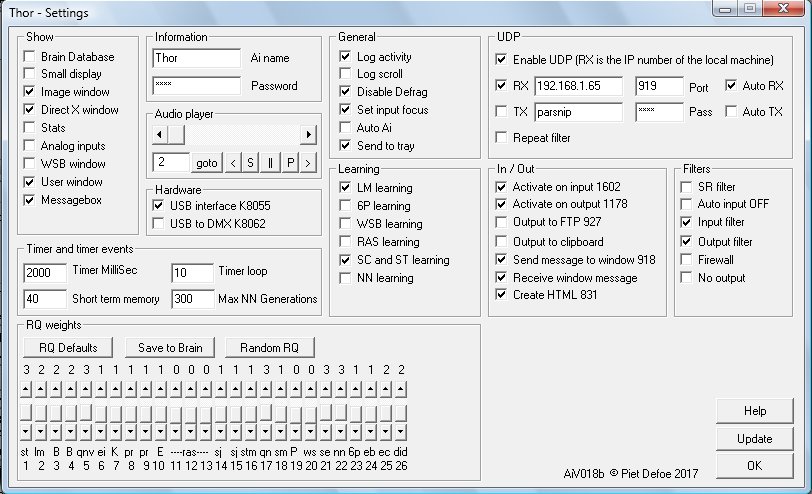
Ai settings control how the Ai works
Can it think?
Whilst this is the goal the Ai
program is very long way from this which is why there is no end
envisaged in the development of the program. Over the past seventeen years
that i have been writing the program i have had to try and analyze in
microscopic detail how we humans understand words and speech, when
someone says something to us what are the thought processes involved.
Whilst this might not be the best way to start such a program it did
seem the most logical approach as a program that can understand and
react accordingly to human input is potentially the most useful. The
Ai takes the sentence and checks it against words in the data base
this produces information like what types of words are in the
sentence nouns, verbs, questions etc. at the time of writing i have
defined 80 different word types. The program also looks at the
structure of the sentence checking this structure or parts of it
against common know patterns this information is also stored in the
data base. This information is then processed by algorithms. At this
time there are 26 processing algorithms. Each algorithm asses the
quality of its reply then the final translation algorithm chooses the
answer that has the highest reply quality RQ and sends its reply to
the output. Translation algorithms are:
Question Noun Verb (QNV) If a question word in the input is followed by a noun followed by a verb then it is assumed the verb is referring to the noun and a match is looked for in the noun and verbs description e.g.. the input "how do fish swim" will produce the output "fish swim fins". This routine gets better with more words in the data base and the better the descriptions.
Question Is (QI) if in the input there is a question followed by the word "is" then the Ai will send the description of the word after "is" to the output e.g.. "what is a fish" will produce the description of the word "fish" the word "a" is ignored. so the output would be "Vertebrate cold-blooded animal with gills and fins living wholly in water or in the sea"
Pattern and sentence code (SC) when the input is translated all the words are assigned a mnemonic dependant on there word type. The Sentence Code (SC) is checked for in the Brain Database(BD) also known patters are looked for in the SC. If a full SC is found in the BD then it has the same functions like any word. If a pattern is found in the SC then the extended pattern functions routine is also used. The pattern routine is used for things like looking in the log for words e.g.. "look in log for fish". The SC for that input is: _Šƒe] the pattern: _Šƒe has been set up to use the word after the pattern as the word to search for in the log, so the word "fish" is searched for. The answer sent to the output is "fish, found in the sentence, input: what is a fish" assuming logging is on in Settings (S). There is an ever expanding list of functions in the extra pattern routine look in help for more details.
Short Term Memory (STM) sometimes referred to as the Data Store holds the previous number of entries as set in settings. Words in the input are compared to words in previous inputs with the most frequently found words coursing a response. If an unknown word is repeated then this is detected. Repeated words are compared with subject words and if a match found then the conversation subject variable is set. If a repeat pattern is found then when the file loops then the SC's are added to the BD, if there are not already in the BD and Learning routine is ticked in settings.
Neural Network (NN) this code was written by a programmer called Boris and integrated into the Ai. The NN code works in a similar way as neurons in our own brains. The NN is mostly used by the NNE routine but some early code is still in the program which uses the NN in a different way.
Neural Network Extended (NNE) this routine is very powerful and has a lot of potential. Each cell can do many different functions depending on how the cell is set up. Cells are activated in sequence using a matrix file or by other means. The cell sets up the weights of the NN and then puts the cells input code into the NN which produces the output code which can be used to control input codes in other cells or follow instructions from associated entries in the main data base.
Reference Action Subject (RAS) the RAS routine
breaks down the input into 3 distinct types. This routine is designed
to look at individual words in more depth. The routine utilizes the
search routine first looking for the subject word then rescanning for
the reference and action words. The assigning of words to different
types is dependant on the types of words in the input ie the subject
word may be the noun in the sentence and the reference may be the
verb in the sentence but if there is no verb and there are 2 nouns
then the reference word will be one of the nouns. Look in the help
file for more details on what words types are used and when. This
routine is proving particularly useful in finding information that
could be in many files. The test, search file, contains over 60
different files from text files to web pages that are searched. The
search takes less than a second on 1296mhz laptop. Because the RAS
routine breaks down the sentence to 3 words only you would have
thought that the meaning in the sentence would be lost but most times
this isn't the case consider the question 'please tell me what the
capital of england is' RAS=england-tell-capital this quite clearly
describes what is wanted, this also means that different ways of
talking or asking for something can still produce the correct
answer.
If a file that is searched contains 2 or more of the RAS
words then the sentence containing the words is sent to the output.
The BD is also searched for the 3 words joined eg.
england-tell-capital if found in the BD field 8 is sent to the
output.
LM, DT, 6P, NNEB, NNEC, These routines use the NN in different ways and are described in more detail in the help files
Functions, uses and jobs
Here are some of the
things i have been teaching the Ai to do.
The Ai can work with a server and receive input from form data, from a web page. This data can be processed by the Ai and the Ai output can be built into a web page. The Ai uses template web pages to construct pages or can insert code directly into a page. This function is most useful for communicating with the Ai over the internet.
Communication using UDP/IP or text files, this can be used for instant messaging or using two programs to pass data e.g. using 'scanimage' and 'compairimage' you can set the Ai to monitor images from a web cam and if the image changes then communicate the information over the internet. Some web cam's come with software that is more sophisticated at monitoring and takes pictures when movement is detected, if this is the case you can use the keyword 'scanfornewfile' which can then let you know when an new image has been taken. The Ai can also read and write to a text file on the computer its running on or to a networked computer. It can also read text files created by third party software.
The Ai can search through files for words in the sentence, the files searched can be different depending on the search type. The search routine can search any text file. The output of searches can be sent to the output, written to a file or embedded in a web page, when the results are embedded in a web page then the filenames are converted to links.
You can run as many different versions of the program on one computer but each instance of the program needs to be in its own folder and have its own database. This means you can use each instance to do a particular job. You could use one as a translation tool for translating from one language to another whilst another is monitoring a zone using a web cam with another as the main communication program receiving inputs from each and processing accordingly then sending the information over the internet to another Ai program on another machine. Linking Ai's has many possibilities.
Stats, statistics are gathered from every routine in the program and displayed as a graph when stats is checked in settings. The thought behind collecting stats was so the Ai could be used for document analysis. The values are converted to a 9 bit binary code which is used for the input code for entries 1000 to 1199 in the database. Look in the help file under 'stats' for more information of which BD cell number relates to which stat. Each inputted word is assigned a number depending on the word type, this number is added to 1200 and the input code of the BD entry is increased. eg. the input in BD entry 1202 is incremented every time a noun is found. The information on what word type has what number is also in the help file. This information can then be processed by the neural network depending on the way the cells are programmed and processed using a matrix file.
The Ai uses a third party program called Auto It. This program is a scripting program and is very good at controlling windows. You can script mouse movements and clicks, which means anything you can do with a mouse an Auto It script can do. Auto It scripts are activated by the keyword 'autoit'.
Functions are describe in more detail in the help file which is part of the download. As the program develops more functions are expected. Its worth pointing out that functionality has not been restricted or controlled so be careful when setting up system commands.
Home | Email Spud | Spud Ai
